


Ice Report
3.798.00 Reviews
App Specs
- Version
- 2.7.1
- Updated On
- License
- Free
- Downloads
- 50,000+
- Developer
- Split Rock Software LLC
- Categories
- Weather
- Platform
- Android
Screenshots
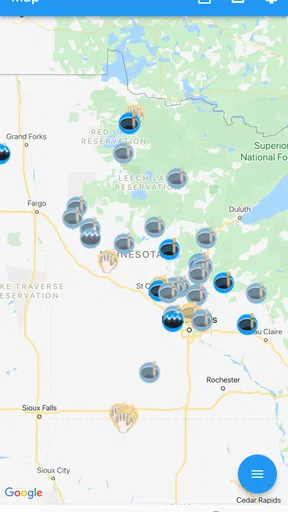
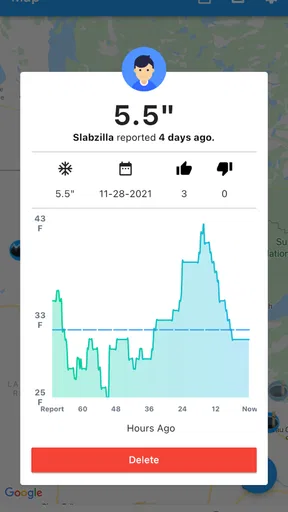
 Analysis by AppCompare
Ice Report is the kind of weather app I would open with a very specific question: is the lake ice worth checking today, and what are other people seeing before I make the trip? Developed by Split Rock Software LLC, it focuses on sharing lake-ice information with the ice-fishing community rather than trying to replace a full general-purpose forecast service. That narrow purpose is its biggest strength, but it also explains why the experience depends so much on timely contributions and a working connection.
I found the idea more useful than a standard weather app when planning a frozen-lake outing. A normal forecast can tell me about air temperature, wind, or snowfall, but it cannot automatically describe the condition of a particular access point or tell me whether another angler recently found safe-looking ice there. Ice Report is built around that local layer of knowledge. Its store short description is simply “Ice Report,” while its broader purpose is to let people share lake ice information quickly. In practice, that makes it a community reporting tool first and a weather companion second.
How Ice Report fits into a real winter outing
I use Ice Report as one checkpoint in a winter outing, not as the decision-maker: first I look for a relevant local observation, then compare it with the forecast and any official guidance before choosing whether to go. That simple handoff keeps a helpful community report in perspective and gives me a fallback when coverage is thin. The next section follows that process from the first planning check through the moment I decide what to do.
The network matters at the moment I need the answer
The most important thing to understand is that the app’s value is tied to fresh, location-specific information. If I am sitting at home planning a weekend trip, browsing reports can help me compare lakes and decide where to start. If I am already driving toward a remote launch, the usefulness depends on whether I can connect at the right moment and whether other users have recently posted something relevant.
That creates a different rhythm from a typical weather app. A forecast app is often useful even when I only want broad conditions for the next few hours. Here, I am looking for community information that can change in importance quickly. An old report may still provide context, but it should not be treated as a current safety decision. I would use Ice Report to inform a plan, not to turn a community post into permission to walk onto ice.
This is also why the app can feel quiet in some situations. Its usefulness naturally varies by location, season, and how active nearby users are. A popular ice-fishing area may offer more practical context than a lake with few contributors. That is not a flaw unique to this app; it is the unavoidable trade-off of a community-powered service. The more local people use it, the more valuable it becomes for everyone else.
When I check it before leaving, I would make the process part of a wider routine: review the latest report, compare it with the local forecast, check any official warnings, and then make a conservative decision. I would not rely on a single entry, especially after a warm spell, heavy snowfall, strong wind, or a sudden change in temperature. The app can help me ask better questions, but it cannot inspect every part of a lake or guarantee that conditions are safe.
Worth Reading Before You Choose

Flipboard Shows What News Apps Must Do Beyond the Feed

Switching to Android Auto Means Rethinking Your Driving Routine

Google Calendar Makes a Crowded Week Easier to Manage

Ludo King Makes the Most of the Minutes Between Plans

Baby Panda World Brings Quick Play to Modern Phones, but Its Game Library Feels Busy

ESPN’s Live Game View Makes Following Close Games Easier
A phone-friendly tool for parking lots, cabins, and shorelines
Ice Report makes the most sense on a phone because the use case is mobile by nature. I can imagine checking it in a cabin before packing, in a vehicle before choosing a lake, or at a public access point before deciding whether to unload equipment. Those short checks are more realistic than sitting down for a long research session. The app’s focused purpose helps in those moments because I am not searching through radar layers, hourly graphs, pollen counts, and unrelated weather panels.
That focus can also be limiting. Someone who wants one app for radar, storm alerts, hourly temperatures, wind direction, and lake reports will probably still need a conventional weather app beside it. Ice Report is not the obvious replacement for a broad forecast service. I see it as a specialist layer that answers a local question a general forecast usually cannot answer.
A practical example would be a Saturday morning trip. I might open a standard forecast app to compare temperature and wind, then use Ice Report to look for recent observations about the lake I am considering. If the community information looks outdated or unclear, I would not fill that gap with optimism. I would either choose a better-documented location, contact someone who knows the area, or postpone the trip. The app is most useful when it improves my decision process, not when it encourages me to force a plan.
Another useful habit is to check before leaving home and again when I reach the general area, provided I have a connection. Conditions and reports can change, and the second check may reveal information I did not see earlier. I would avoid opening the app for the first time at the exact point where a weak signal could leave me without the context I wanted. Since the experience is centered on shared information, connectivity is part of the practical workflow rather than a minor technical detail.
What happens when reports are old, sparse, or hard to interpret
The main recovery problem is not necessarily a crash or a broken screen. It is uncertainty. If I open the app and find no useful recent report for my destination, I need a clear backup plan. The sensible response is to combine other sources rather than assume that silence means good conditions. A missing report is not the same as a positive report.
I would also pay attention to how specific a contribution is. A general comment about a lake may not apply equally to every bay, inlet, access road, or sheltered shoreline. Ice can vary dramatically across a single body of water. A useful report should be treated as one observation from one place and time, not as a complete map of conditions. That is an important limitation for anyone expecting the app to provide certainty.
For recovery after a failed connection, my approach would be simple: avoid depending on the app as the only source of information, check it while I still have reliable service, and keep local alternatives in mind. Those alternatives might include official notices, local bait shops, experienced anglers, or direct knowledge of the lake. I would not claim that the app provides offline access, so I would plan as though the latest information may require a live connection.
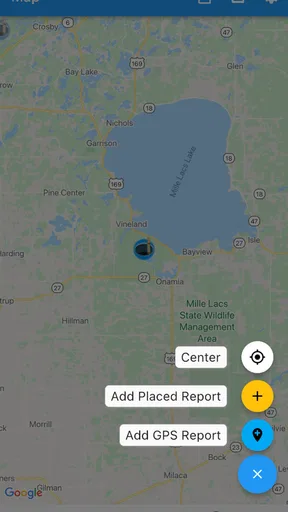
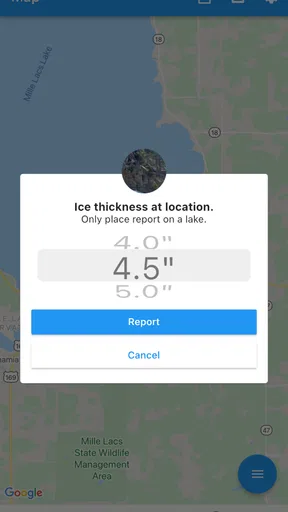
There is also a social recovery step. If I visit a lake and learn something genuinely useful, contributing a clear report can make the next person’s planning easier. A short, precise observation is more valuable than a vague statement. I would include the lake and the relevant area when possible, describe what I actually observed, and avoid presenting a personal impression as a safety guarantee. That kind of restraint matters in a community tool.
Using the app without wasting mobile data
Ice Report is not the sort of app I would leave open continuously while traveling. A more sensible pattern is to open it at deliberate checkpoints: while planning, before departure, and again when a reliable connection is available near the destination. This keeps the app’s network use tied to a decision instead of turning it into something I refresh repeatedly without gaining meaningful information.
I would also avoid treating repeated refreshes as a substitute for new reports. If no one has added a fresh observation, reopening the same screen will not make the information more current. The better use of a limited data plan is to check at sensible intervals and then compare what I find with the broader conditions outside the app.
For contributors, concise updates are especially valuable. The app’s purpose is fast sharing, so a report should focus on information that helps another person understand the situation. Long, unclear entries may use more time without improving the decision. A practical report might distinguish between what was personally observed and what was heard from someone else, while avoiding absolute claims about safety.
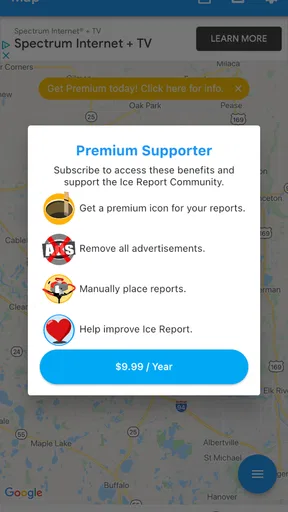
I would be careful with in-app purchases as well. Ice Report is free to install, but individual in-app items are listed in the range of $9.99 to $12.99. That means I would look closely at what an optional purchase adds before paying, especially if I only need occasional local information. A frequent ice angler may judge the value differently from someone who visits a frozen lake once or twice each season. The free entry point makes it easy to evaluate the basic experience first.
Where it is stronger than ordinary weather apps
The clearest advantage is specialization. A general weather app can tell me that the temperature has stayed below freezing, but that alone does not describe what is happening on a particular lake. Ice Report is aimed at the missing human detail: observations from people who are thinking about ice conditions in the same practical way I am.
That local emphasis can save time. Instead of interpreting several weather variables and guessing how they translate to a specific fishing spot, I can look for community context and then use the forecast to test whether that context still makes sense. The two types of information work better together than either one does alone.
Its focused design is also less distracting for this particular task. When I am deciding whether to investigate a lake, I do not necessarily need a full weather dashboard. I need relevant reports and enough surrounding context to judge how much confidence to place in them. That is where the app has a clear identity.
Still, I would choose a normal weather app first if my main concern were storms, radar, hourly precipitation, or a detailed forecast for a whole trip. I would also prefer a more established local information source if my area has an active official ice-reporting service or a trusted community with better coverage. Ice Report is not automatically the best answer simply because it is dedicated to ice.
Who should use it, and who should skip it
I think Ice Report is best for ice anglers who regularly compare lakes, people who want to contribute observations, and newcomers who need a starting point for gathering local context. It is particularly reasonable for someone who already uses a separate forecast app and wants a community-focused companion rather than another all-purpose weather dashboard.
The app is less suitable for someone who expects complete coverage everywhere, guaranteed current conditions, or a replacement for personal judgment. It may also disappoint a user who only wants a conventional forecast and has no interest in reading or sharing lake-specific observations. In that case, the focused design becomes unnecessary rather than helpful.
The age rating is Everyone, and the app is free to begin with. It supports Android devices using version 7.0 or later, and the current version is 2.7.1. Those details make it approachable for people using older compatible phones, though the real question is still whether nearby reports are useful for the lakes they visit.
My experience of the app’s maturity and reach
Ice Report has been available since January 14, 2016, which gives it a longer presence than a brand-new seasonal experiment. Its average rating is 3.7 from around 170 ratings, with roughly 98 written reviews, and it has passed 50 thousand installs. I read those figures as a sign of a focused but relatively modest community rather than a universal weather platform.
That scale matters because community tools live or die by participation. A large install count does not guarantee a recent report for my lake, and a smaller audience does not make every report unhelpful. I would judge it by the quality and freshness of information around the places I actually fish. Before depending on it, I would spend a little time checking whether my usual area has meaningful activity.
The developer, Split Rock Software LLC, has chosen a narrow problem to solve: helping people exchange lake-ice information quickly. I appreciate that clarity. At the same time, a narrow app needs a matching audience. If the local network is inactive, no amount of general weather data inside another app will be replaced by this one.
My connectivity verdict
Ice Report is most valuable as a connected community check, not as a standalone safety authority. I would use it before a trip to find local observations, again when I have dependable service, and alongside forecasts and official guidance. I would not assume that a blank result means safe ice, and I would not plan around a report whose age or location makes it questionable.
The app’s best trade-off is its specialization: it can add human, lake-specific context that ordinary weather apps usually lack. Its main weakness is the same thing in reverse: the experience depends on contributors, local activity, and access to current information. That makes connectivity and community participation central to the product rather than background conveniences.
After trying to view it as part of a real outing, I would recommend Ice Report to regular ice anglers who want another source of local observations and are willing to contribute responsibly. I would skip it as my only planning tool, and I would not install it expecting radar or a complete forecast suite. Used with realistic expectations, it can make the research stage of a winter trip more informed. Used as a guarantee, it asks far more of a community app than it can safely provide.
Pros
- Quickly reports local ice conditions for safer travel planning.
- Useful location-based information for winter driving decisions.
- Simple interface makes checking conditions fast.
- Can help users avoid hazardous or unexpectedly icy routes.
- Practical tool for commuters
- travelers
- and outdoor enthusiasts.
Cons
- Coverage may be limited to supported regions or reporting networks.
- Condition updates can become outdated as weather changes quickly.
- Reports may depend on user submissions and vary in accuracy.
- Some features may require location access or an internet connection.
- The app may offer limited value outside the winter season.
FAQs for Ice Report
What is Ice Report, and what can I use it for?
Ice Report is designed to provide information related to ice conditions, helping users check whether an area may be suitable for travel, outdoor activities, or general planning. Its usefulness depends on the location and data available in the app. Before relying on any report, users should review the latest update time and remember that ice conditions can change quickly due to weather and local factors.
Does Ice Report provide accurate and up-to-date ice condition information?
The app can be a convenient reference, but its reports should not be treated as a guarantee of safety. Information may come from submitted observations, official sources, sensors, or other available data, and coverage can vary by region. Always check when a report was published, compare it with local advisories, and use your own judgment before stepping onto or traveling across ice.
Does Ice Report work without an internet connection?
Ice Report may require an internet connection to load maps, refresh reports, retrieve location-based information, or send new observations. Some previously viewed information might remain available temporarily, but users should not assume that offline data is current. If you are planning to visit a remote area, open the relevant information beforehand and prepare an alternative source of local safety updates.
Is Ice Report free to download and use?
The availability of free features, optional purchases, advertising, or subscription plans can depend on the version of Ice Report and the platform where it is downloaded. Users should check the app store listing for the current pricing details before installing. It is also worth reviewing whether any premium tools are required for advanced reports, notifications, maps, or other location-based features.
Can Ice Report be used as a safety guarantee when going onto ice?
No. Ice Report should be viewed as an information and planning tool rather than a replacement for official warnings, local expertise, or personal safety precautions. Ice strength can differ significantly across a single lake or route, even when an app displays a favorable report. Check local authorities, inspect conditions carefully, avoid unfamiliar ice, and never take unnecessary risks based only on app information.


